
S2S Tracker Basics
This section explains how to connect Adexium to a third-party affiliate tracker so that conversions are reported back to Adexium via S2S postback. This page covers what is common to every tracker; the per-tracker guides below cover the exact fields and tokens.
Per-tracker guides:
How It Works
The flow is the same for every tracker:
- Adexium → tracker. Your campaign URL in Adexium points to your tracker and passes our click ID via the
[CLICK_ID]macro. - Tracker stores the click ID. Configure Adexium as a traffic source in the tracker and map the incoming parameter to the tracker's "external ID" field.
- Tracker → Adexium. When a conversion fires, the tracker calls our postback URL and puts the stored click ID back into the
click_idparameter.
Postback Endpoint
http
GET https://go.atechspace.live/conversion?click_id=...&event_type=level1&key=YOUR_POSTBACK_KEYParameters:
| Parameter | Required | Description |
|---|---|---|
click_id | yes | The Adexium click ID you received via the [CLICK_ID] macro |
event_type | no | level1 (default), level2 or level3 — see mapping below |
key | yes | Your postback key — copy it from the Tracking page in the dashboard |
payout | no | Conversion revenue in USD (plain number, e.g. 0.37). Recorded for reconciliation only |
Event mapping:
| Event | Meaning |
|---|---|
level1 | Registration / Install |
level2 | First Deposit |
level3 | 2nd+ Deposit |
Technical Requirements
- HTTP method: GET (POST is accepted too, but all parameters must stay in the query string — the request body is ignored).
event_typemust be exactlylevel1/level2/level3; any other value returns HTTP 400.- Success response:
200with{"message":"Accepted"}. Treat only200as delivered. - Deduplication: repeated postbacks for the same click ID and level are ignored.
- The
keyproves the postback came from you. Keep it out of client-side code and rotate it from Account → Security if it leaks (the previous key keeps working for 7 days).
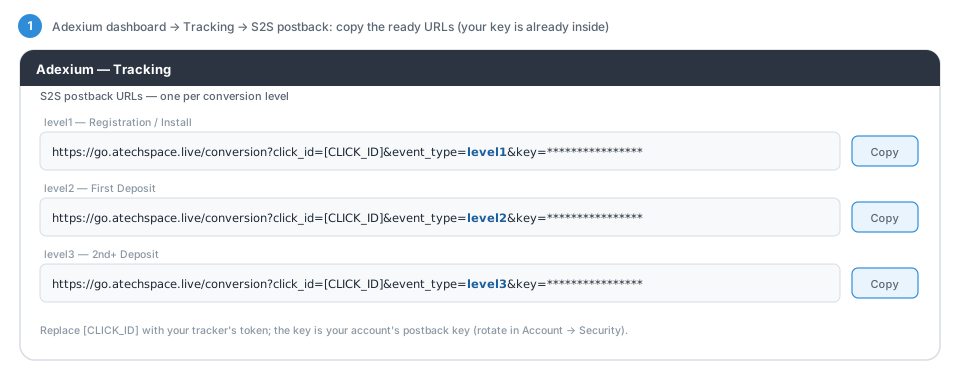
Ready-to-copy postback URLs for each level — with your key already filled in — are on the Tracking page of your Adexium dashboard:
End-to-End Example (Voluum)
- Adexium campaign URL:
https://track.example.com/abc?externalid=[CLICK_ID] - User clicks the ad — Adexium replaces the macro:
https://track.example.com/abc?externalid=d95c746d-31c7-4183-8fa7-42ce39b65e47 - Voluum stores
externalid = d95c746d-...and redirects the user to the offer. - Conversion fires (registration) — Voluum calls:
https://go.atechspace.live/conversion?click_id=d95c746d-31c7-4183-8fa7-42ce39b65e47&event_type=level1&key=YOUR_POSTBACK_KEY - Adexium responds
200 {"message":"Accepted"}and the conversion appears in your campaign statistics.
Other Trackers
Any tracker that supports custom traffic sources and S2S postbacks works the same way:
- Pass
[CLICK_ID]into the tracker's external/click ID parameter in the campaign URL. - Use the tracker's token for that stored value in our postback URL's
click_idparameter. - Map your conversion types to
event_type=level1/level2/level3.
If you use a tracker not listed here and something does not work, contact us via the support bot.