
Conversion Tracking for Telegram Channels
If your campaign sends traffic to a Telegram channel, there is no landing page and no backend to fire a postback from — the target action is the subscription itself.
Adexium tracks it with a bot: you add @AdexiumChannelBot to your channel as an administrator, we see who joins, match those users with the people who were shown your ad, and register a level1 conversion for each match. No code, no pixel, no integration on your side.
Availability
| Traffic | Channel subscriptions as conversions |
|---|---|
| Telegram Mini Apps (TMA) | ✅ supported |
| Telegram bots | ✅ supported |
| Web popunder / in-page / push | ❌ not supported — use the pixel or a postback |
The match is made by Telegram user ID, and that ID only exists in Telegram inventory. On web formats we cannot tell that the person who subscribed is the same person who saw your ad.
Step-by-Step Instruction
1. Point the campaign at your channel
In the campaign settings, set the link to your channel:
https://t.me/your_channelUse the same address you will give us in step 3 — the campaign and the channel are linked by this URL.
2. Add @AdexiumChannelBot to the channel as an admin
Open your channel → Manage Channel → Administrators → Add Administrator, then search for @AdexiumChannelBot and select it.
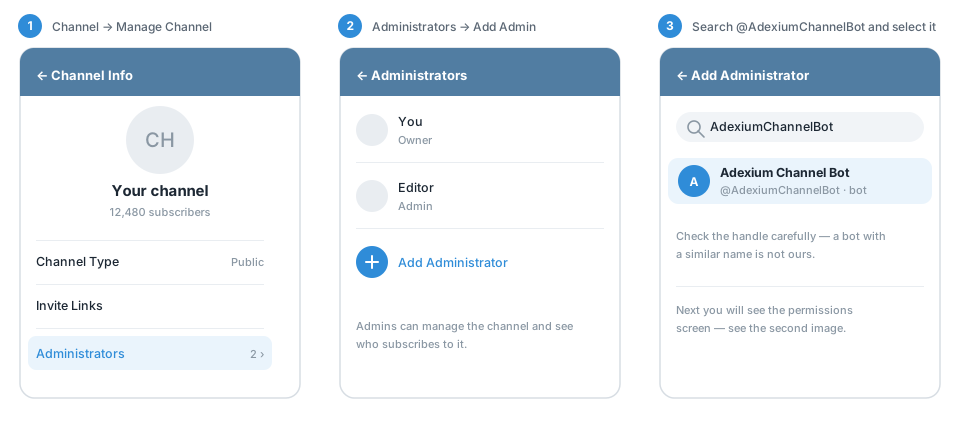
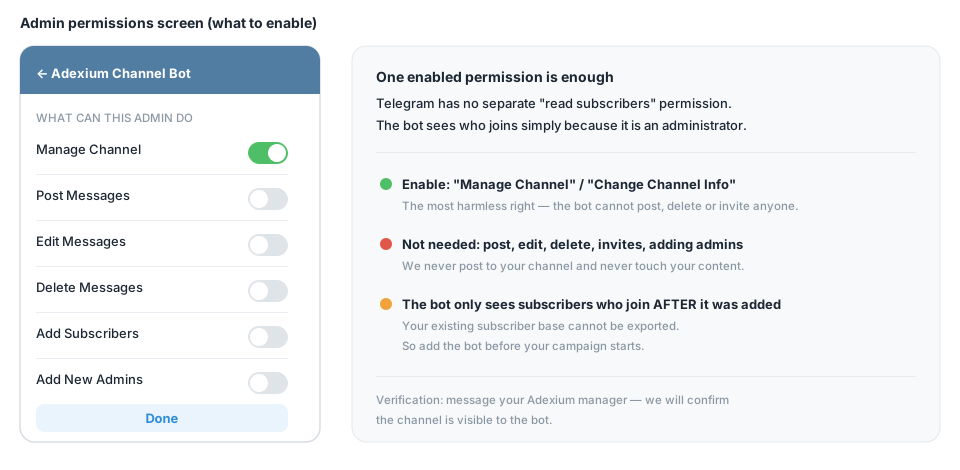
On the permissions screen, one enabled permission is enough. We recommend the most harmless one — Manage Channel (Change Channel Info). Posting, editing, deleting, invites and adding admins are not needed.
Why admin rights at all?
Telegram has no separate "read subscribers" permission. A bot can only see who joins a channel if it is an administrator there — that is the only reason we ask for it.
3. Tell us the channel
Message your account manager or @AdexiumSupportBot with the channel link. We connect the channel on our side and confirm that the bot sees it.
4. Watch the conversions
From that moment new subscribers who were shown your ad are counted as level1 conversions and appear in your campaign statistics, alongside conversions from any other source.
Important
- Add the bot before the campaign starts. Only users who join after the bot became an administrator are counted. Your existing subscriber base cannot be imported.
- Keep the bot in the channel for as long as the campaign runs. If you remove it, tracking stops.
- The channel link in the campaign must match the channel the bot sits in.
- Unsubscribes are not deducted from conversions.
What the bot does and does not do
| Does | Does not |
|---|---|
| Reads the list of channel participants | Post, edit or delete anything in your channel |
| Registers new subscribers as conversions | Message your subscribers |
| Reports the subscriber count | Add or remove members, or manage other admins |
FAQ
Can I use this together with the pixel or a postback? Yes. Channel subscriptions are just another source of level1 conversions for the campaign.
Do I need to give the bot posting rights? No. One permission is enough, and Manage Channel is the safest choice.
The channel is private / invite-only — will it work? Yes, as long as the bot is an administrator and the campaign link is the same channel. Contact support so we connect it correctly.
I added the bot but see no conversions. Check that (1) the bot is still an administrator, (2) the campaign link points to that exact channel, (3) the campaign runs on TMA or Telegram bot traffic, and (4) you told us the channel. If all four are true, message @AdexiumSupportBot.