
Conversion Tracking with BeMob
How to connect BeMob to Adexium so conversions come back to us via S2S postback. Postback endpoint, full parameter list, response codes and the postback key are described in S2S Tracker Basics — this page covers only the BeMob-specific steps.
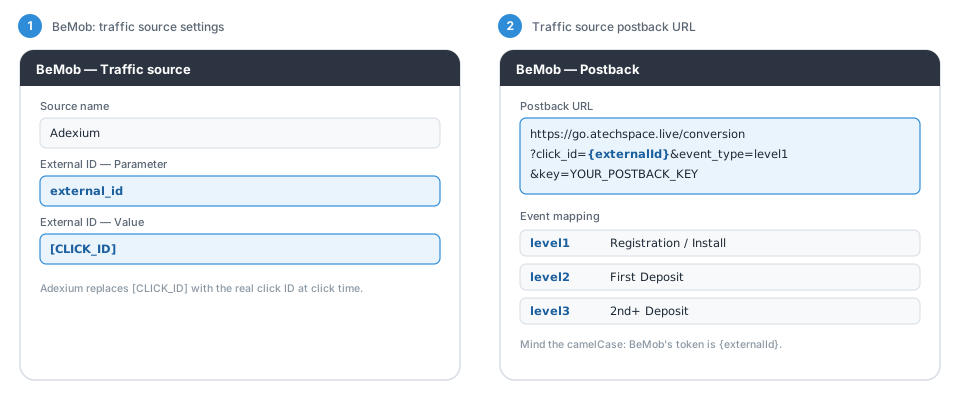
The illustration below is schematic: field names match BeMob's settings, but the visual layout is simplified.
1. Traffic Source in BeMob
In BeMob create a custom traffic source "Adexium". In the External ID parameter row set the parameter name to external_id and the value to [CLICK_ID].
2. Traffic Source Postback URL
Set the postback URL with BeMob's {externalId} token (mind the camelCase):
http
https://go.atechspace.live/conversion?click_id={externalId}&event_type=level1&key=YOUR_POSTBACK_KEYOptionally append &payout={payout}.
3. Campaign URL in Adexium
Copy the BeMob campaign URL into your Adexium campaign:
http
https://YOUR-BEMOB-DOMAIN.com/PATH?external_id=[CLICK_ID]Event Mapping
| Event | Meaning |
|---|---|
level1 | Registration / Install |
level2 | First Deposit |
level3 | 2nd+ Deposit |
Verify
- Open the campaign URL preview in BeMob and check that
[CLICK_ID]is present verbatim — the macro is replaced by Adexium at click time, not by the tracker. - Send a test click, take the real click ID from BeMob's click log and fire the postback manually in a browser. You should get
{"message":"Accepted"}. - Check the Tracking page in the Adexium dashboard — the conversion appears in campaign statistics within a few minutes.
Questions — contact us via the support bot.